🪔 File City
I have a problem where I start ambitious projects, get them to the point where they basically work, and then move on to the next thing. File City is one of those projects. But it is also one of the coolest things I have built, so I want to talk about it before it sits in my repositories collecting dust forever.
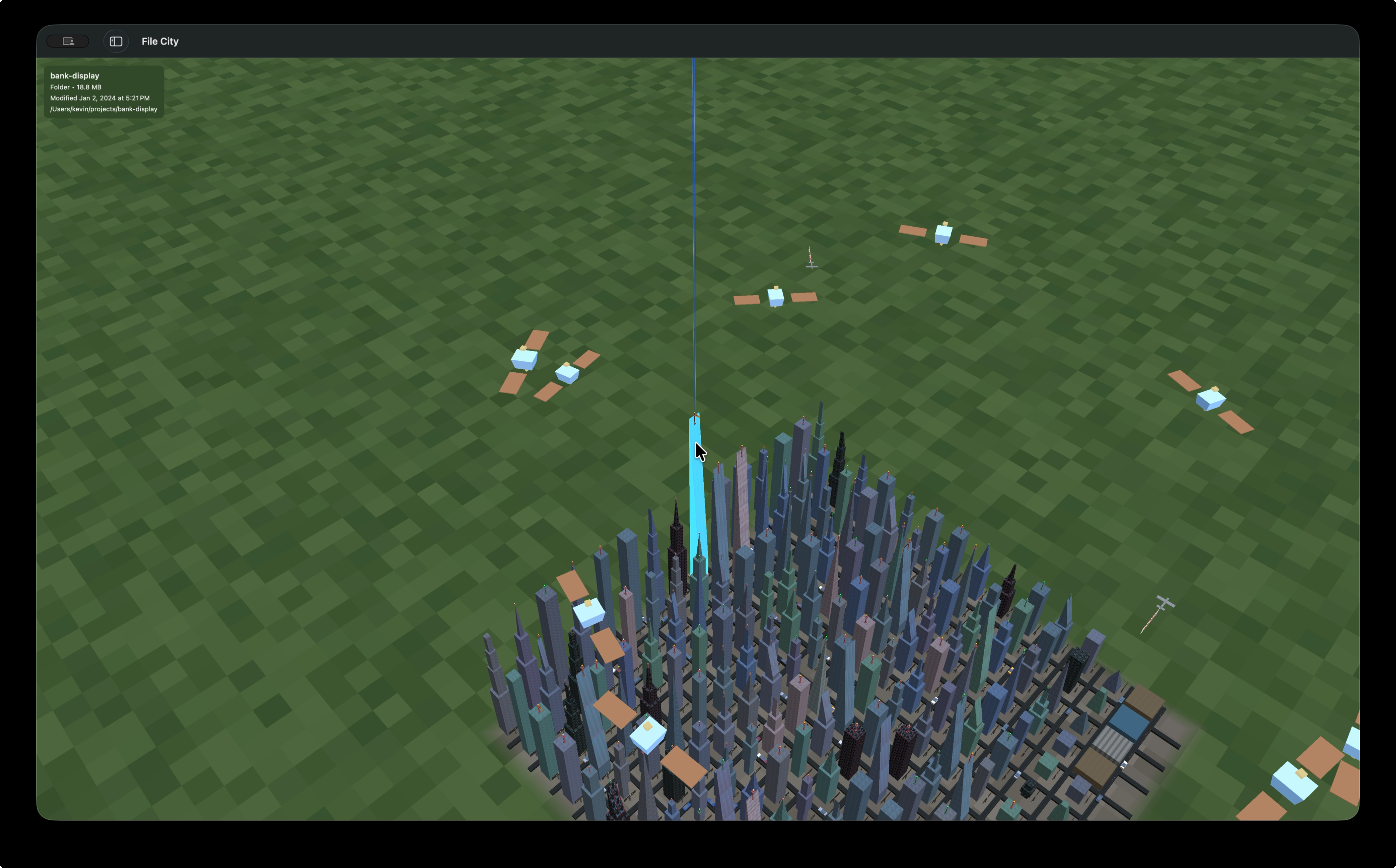
File City is a native macOS app, written in Swift and Metal, that turns any directory on your computer into a 3D city. Every folder becomes a building. Every file becomes a smaller structure. The whole thing renders in real time on the GPU, and you can walk through it, fly over it, and watch your AI coding agents interact with it.
The City
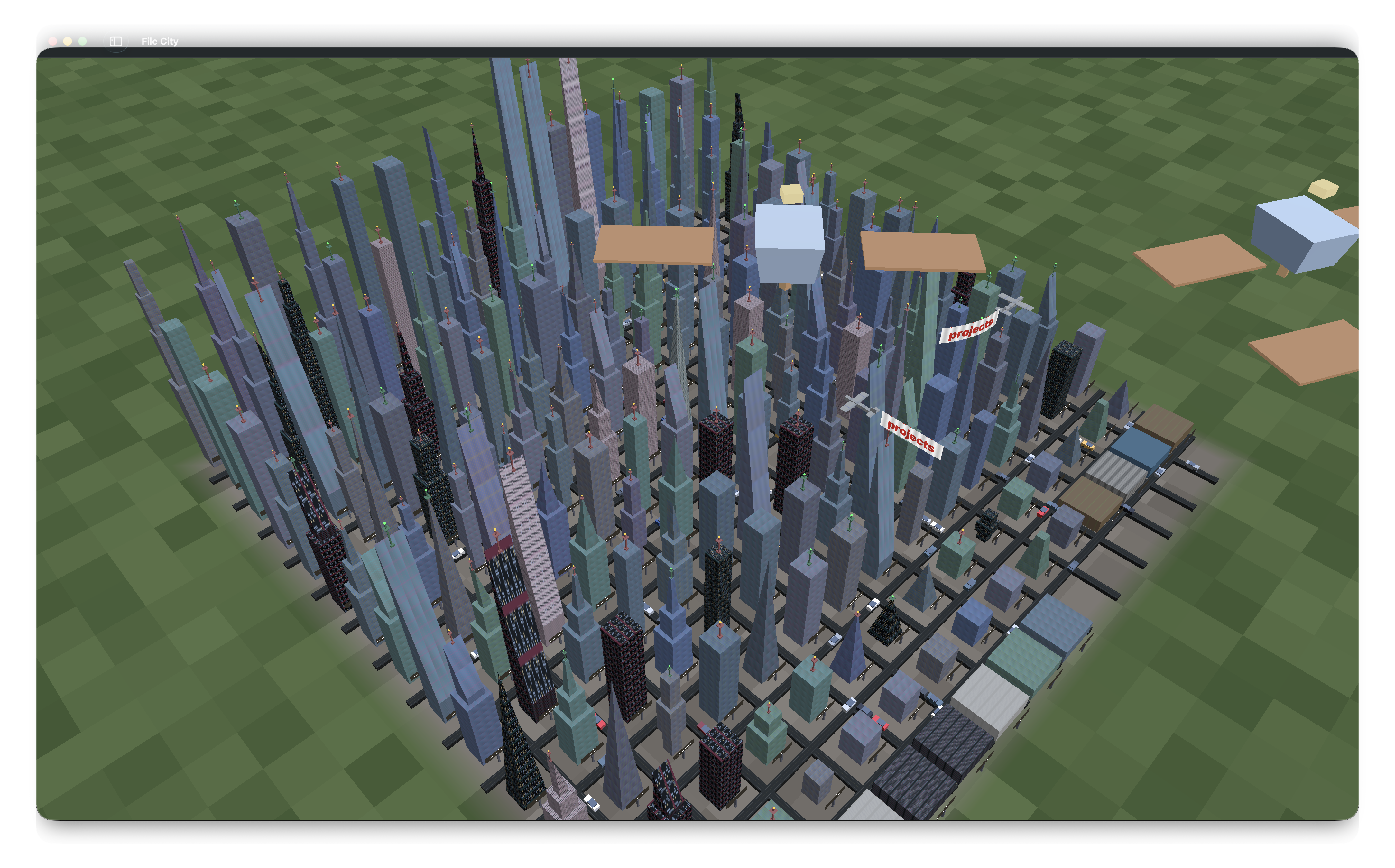
When you open a directory, File City scans it recursively and maps the contents onto a grid. Folders become buildings, sized proportionally to how much stuff is inside them. A folder with gigabytes of data becomes a skyscraper with multiple tiers stacked on top of each other, each tier narrower than the one below it, crowned with a decorative shape like a pyramid or a spire. A tiny config file becomes a short block on the street.
The buildings are not random. Each one gets its shape, material, and texture deterministically from its file path, so the same project always looks the same. Swift source files have a distinct look. Images, videos, databases, archives all get their own visual identity. You start to recognize the shape of your codebase after a while.
Between the buildings there are roads, and on those roads there are Tesla Model 3s driving around. They have animated wheels, glass canopies, headlights, taillights, the whole thing. They serve no functional purpose. They just make the city feel alive.
Walking the Streets
The default view is isometric, looking down at the city from a 45-degree angle. You can zoom, pan, scroll. But the more interesting way to experience it is on foot.
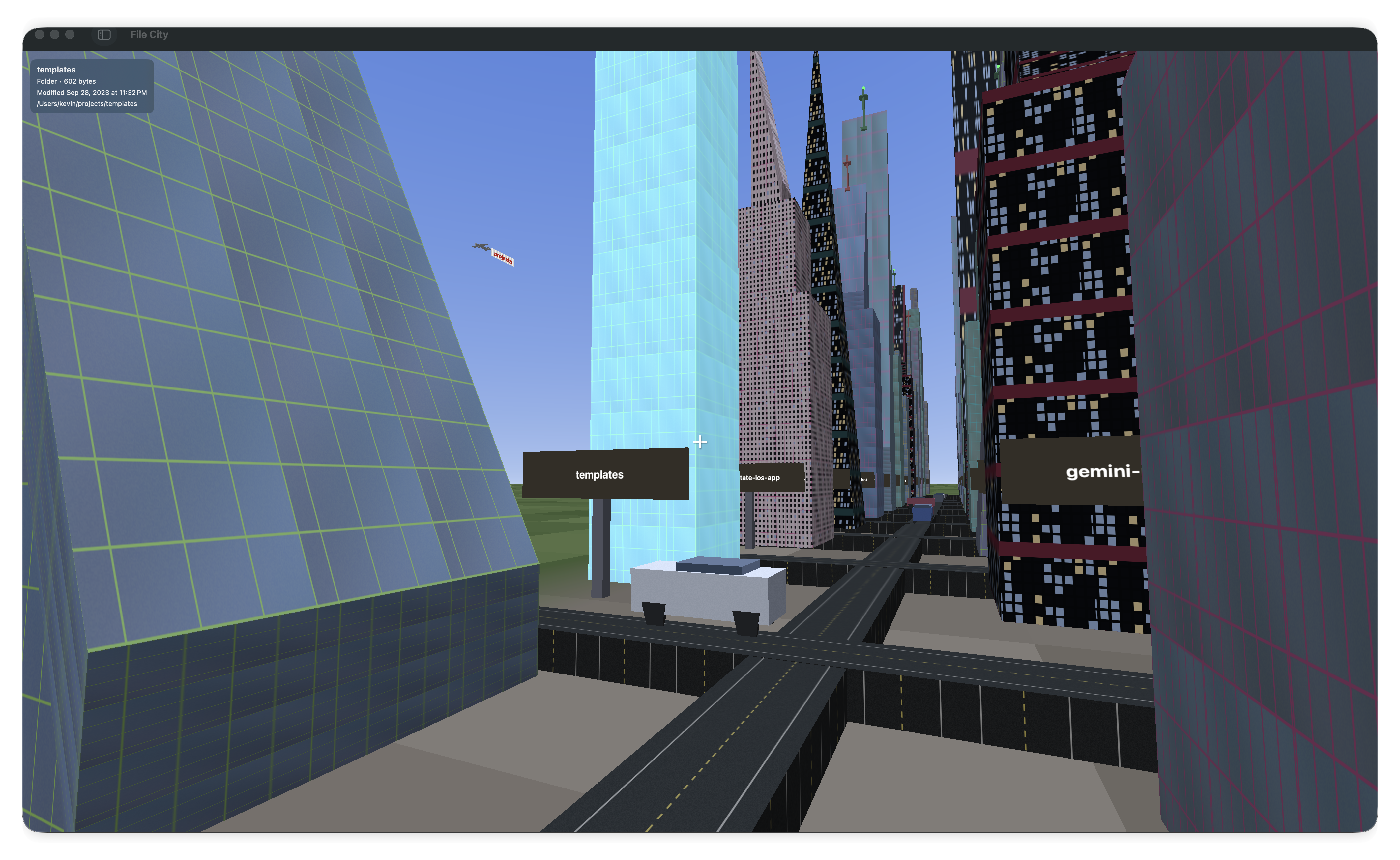
Press F and you drop into first-person mode. WASD to walk, mouse to look around, space to jump. There is collision detection, so you bounce off buildings instead of clipping through them, and you can jump onto rooftops. Double-tap W to sprint. Double-tap space to fly.
The grapple is my favorite part of the movement system. Hold shift while looking at anything and you get pulled toward it at high speed. A building, a car, a plane in the sky. Once you arrive you latch on. If the thing is moving, you ride it. It feels like being Spider-Man. I kept grappling onto the planes to get an aerial view of the city, and at some point I thought: why not just let me fly the plane?
Flying
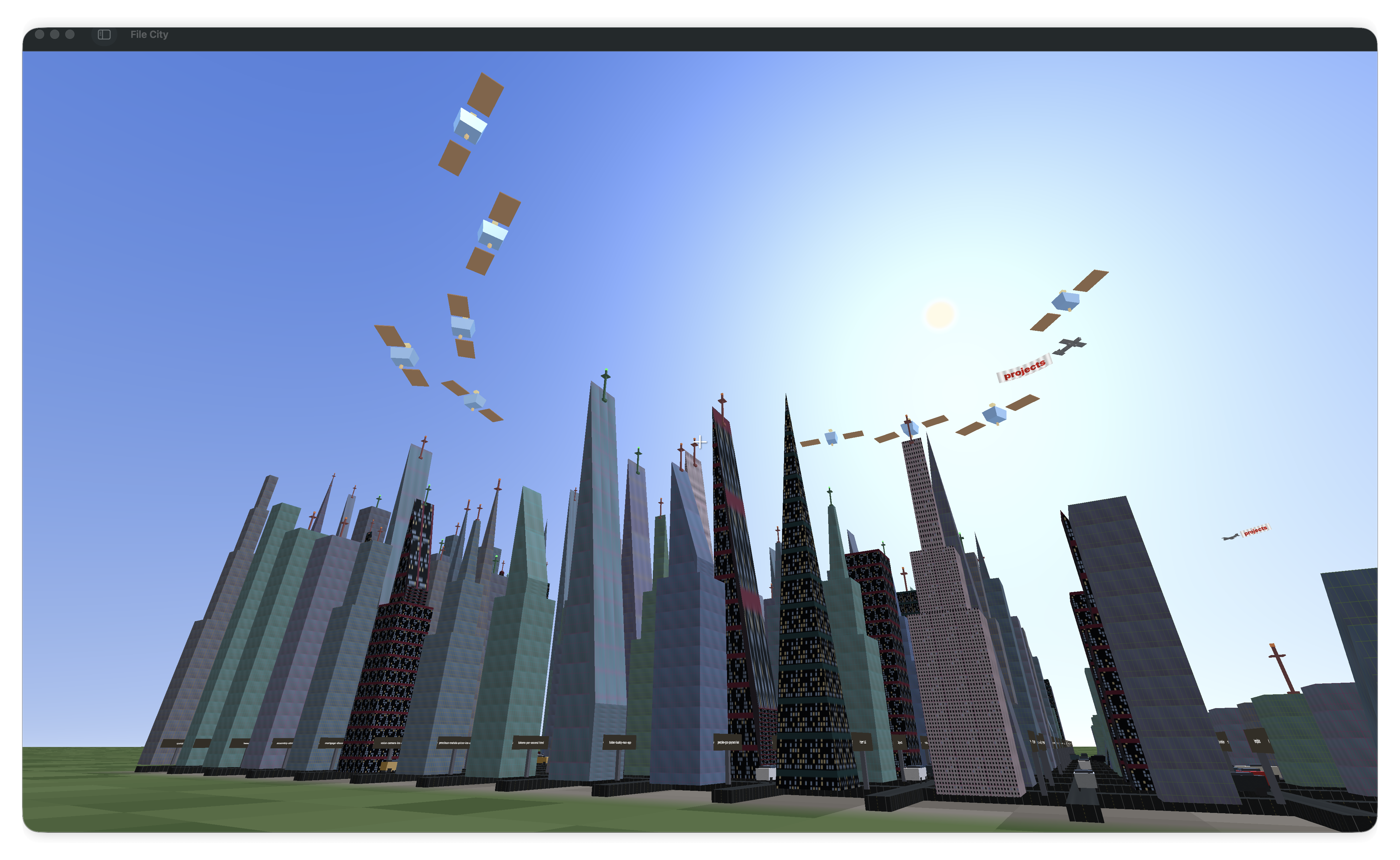
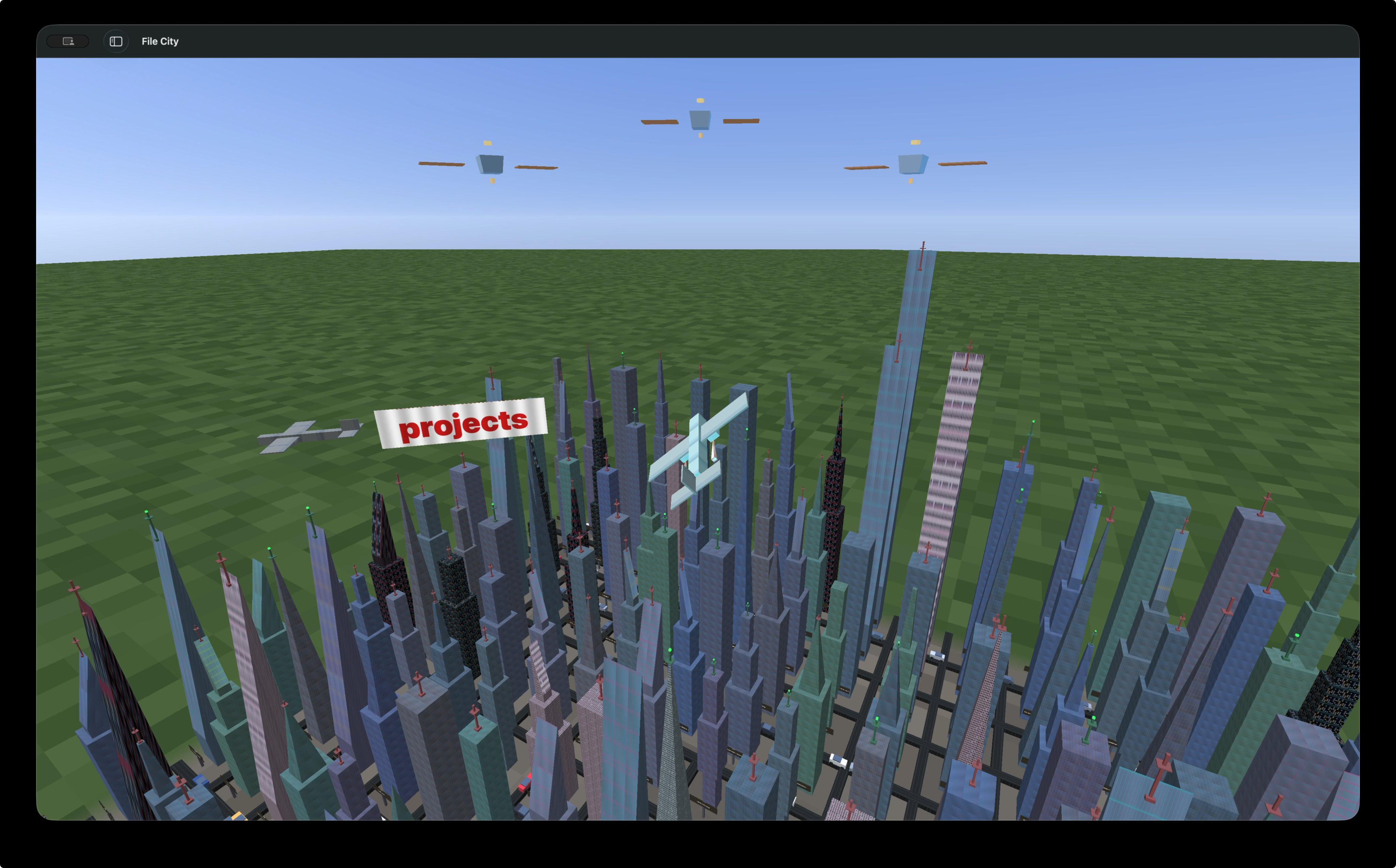
So I did. Multiple planes fly above the city on autopilot, each trailing a banner that displays the name of the current directory. They look like little biplanes doing laps over the skyline. You can interact with them in a few ways: hover your cursor over one to speed it up, click one to blow it up (it explodes into 25 physics-simulated debris particles and respawns), or grapple onto one and board it.
When you board a plane, you enter a flight mode with real physics. Thrust, lift, drag, gravity, banking turns. The plane responds to pitch and roll inputs, and the flight model is detailed enough that you can pull off aerobatics. Double-tap W for an outside loop. Double-tap A or D for a barrel roll.
It is the most overengineered feature in the app and the one I had the most fun building.
The Real Purpose
All of that is fun, but it is not why I built the thing. Around November 2025, AI coding agents crossed a threshold where they could genuinely collaborate on complex projects. I wrote about this in The Software Printing Press Moment. I wanted to test what these models could do in a 3D domain, which is a harder problem than most coding tasks because you are fighting coordinate systems, GPU shaders, real-time rendering, and physics all at once. But I did not want to build a throwaway demo. I wanted something with actual affordances, something where the 3D representation earned its existence. I used Gemini to help design some of the visual aspects, and Claude Code for most of the systems programming.
The concept I landed on was a file system visualizer for AI agent activity. When you have multiple Claude Code sessions running on the same codebase, it is hard to keep track of what each one is touching. Terminal output scrolls by. File changes pile up. You lose the big picture.
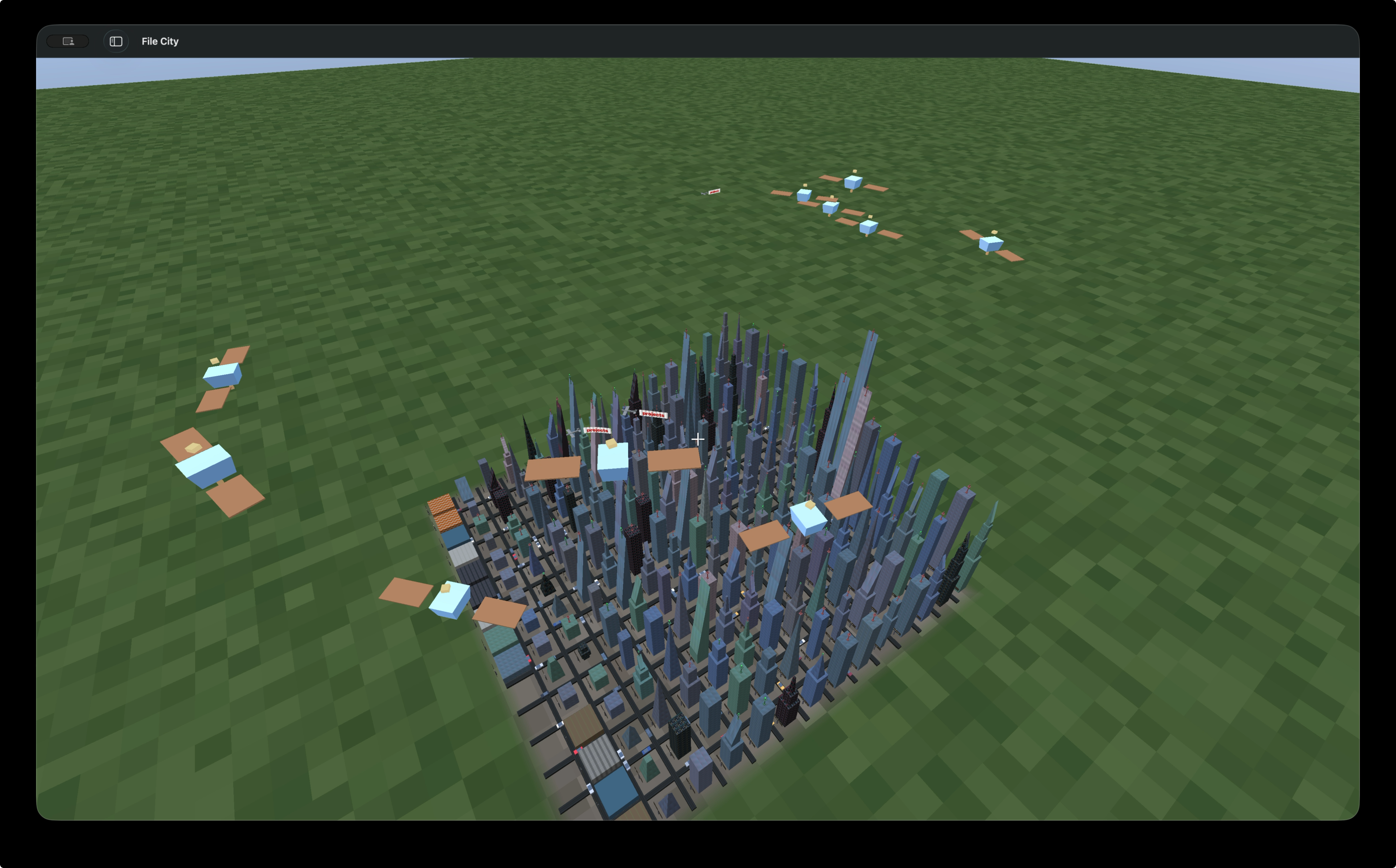
File City was supposed to be the big picture. Each running Claude Code session appears as a satellite orbiting above the city. The satellites have solar panels, antenna dishes, and a status beacon that pulses differently depending on what the session is doing: dim orange when launching, bright blue when idle, fast-pulsing cyan when actively generating. You can grapple onto satellites and ride them around their elliptical orbits, which is fun but not the point.
The point is what happens when those sessions touch files.
Watching Agents Work
File City monitors file system activity in real time. It filters for AI tools specifically, Claude Code, Codex, Gemini, Cursor, and triggers different animations depending on whether a file is being read or written.
When an agent reads a file, a beam of cyan light shoots up from the corresponding building, 800 units tall, glowing for about two seconds. It looks like the building is being scanned, which is basically what is happening.
When an agent writes a file, a helicopter flies in from offscreen, hovers above the target building, and drops a package. The package falls with physics-based gravity, lands on the rooftop, and explodes in a burst of particles. Then a construction worker pops out of the wreckage, slides down the face of the building, and starts walking around on the surface. Up to 100 workers can be active at once, so a busy coding session leaves little figures all over the city.
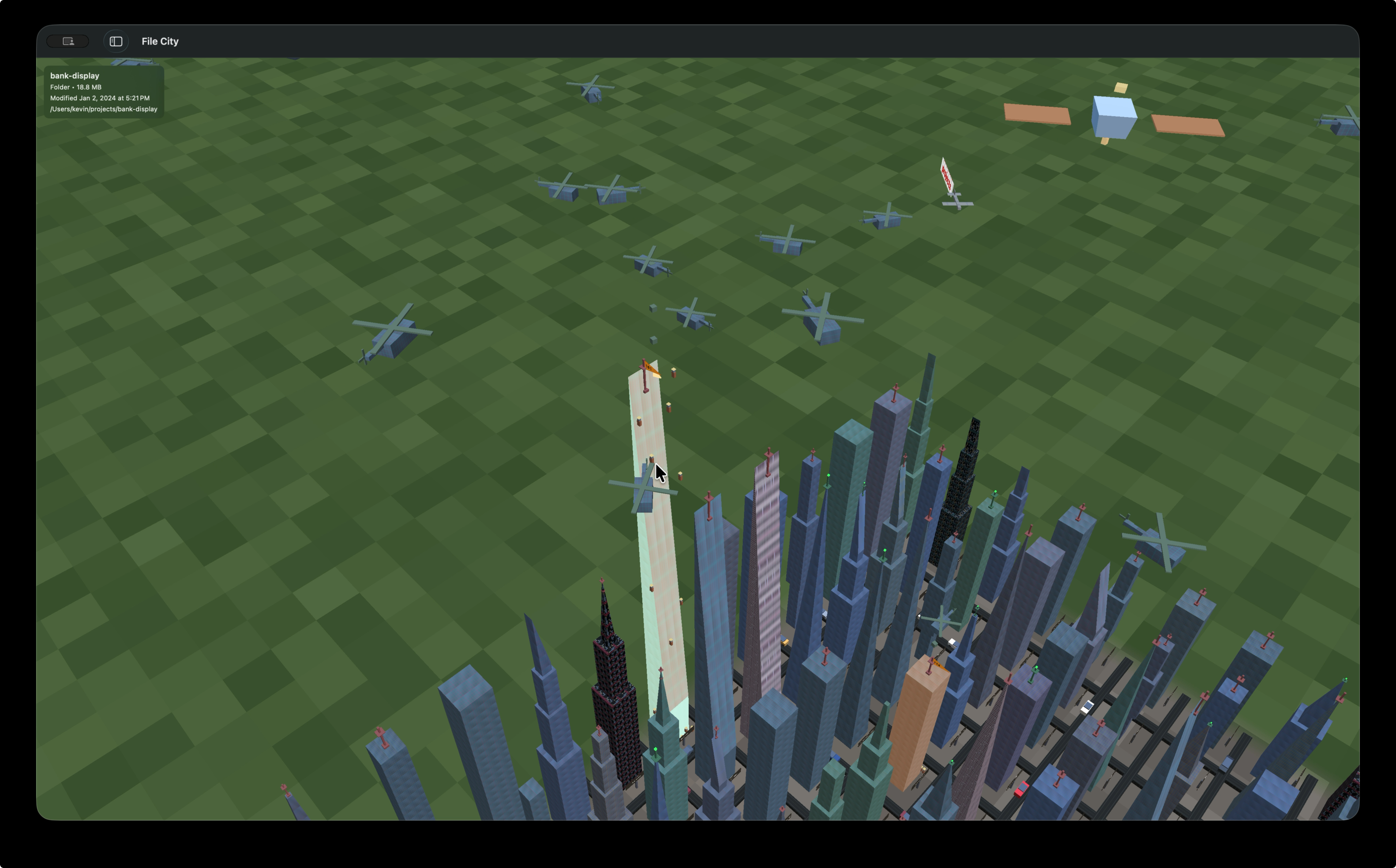
The buildings themselves glow during activity, orange for writes and blue for reads, and an info panel shows which process is touching which file. The idea was to sit back, watch the city, and know at a glance which parts of your codebase are being actively worked on by which agent.
Git
When you load a git directory, a slider appears at the bottom that lets you scrub through the project’s commit history, up to 200 commits deep. Drag it left to go back in time, right to come forward. At each position, the city rebuilds itself to reflect the state of the repository at that commit. Buildings appear as new files are added. They grow taller as folders accumulate content. Some shrink or vanish entirely when code gets deleted or refactored away.
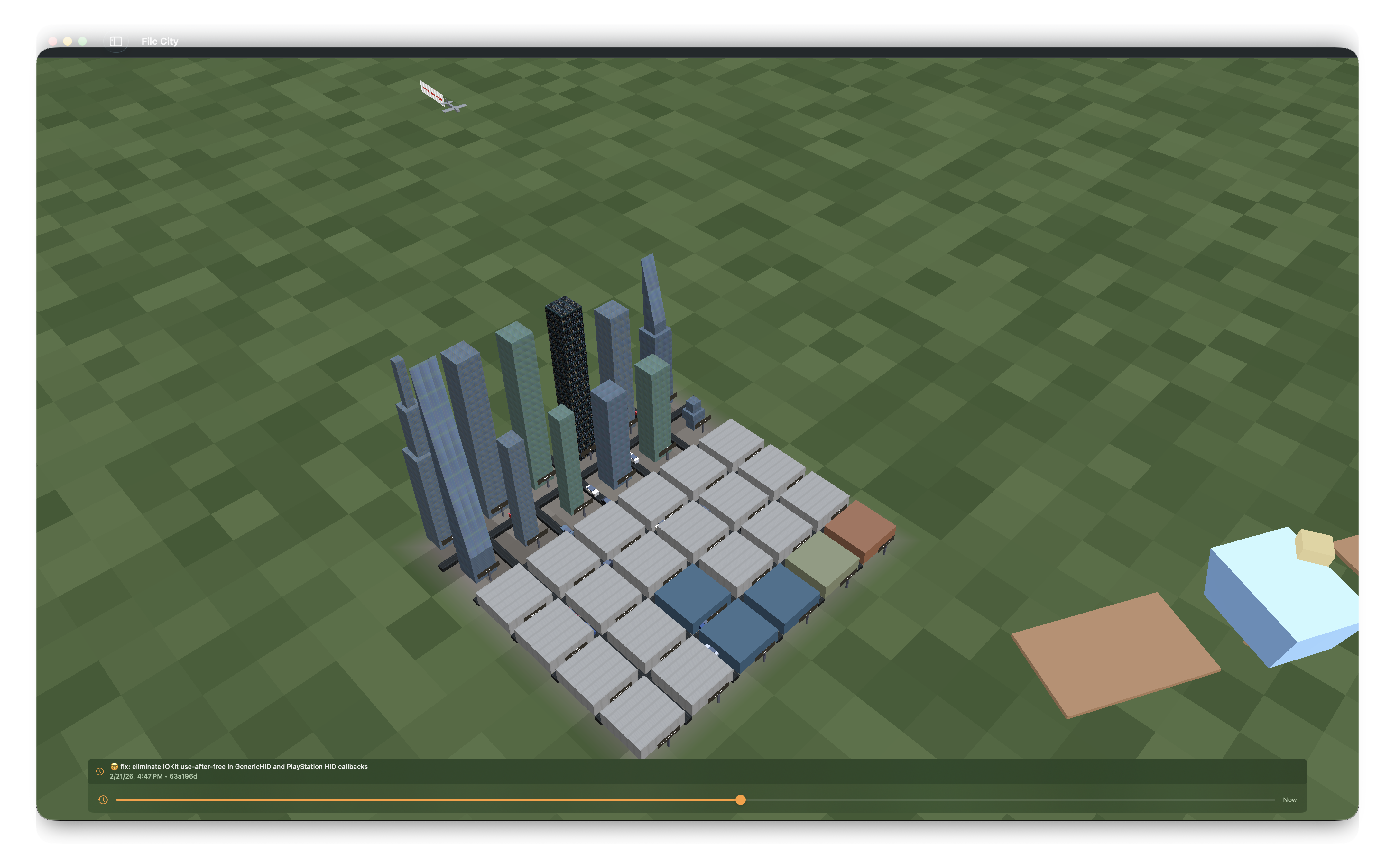
You can watch your project grow from its first commit to the present, or rewind to see what it looked like six months ago. You can see the moment a project went from a handful of files to a real codebase. You can spot the commit where someone dumped a giant vendor directory and the skyline jumped. It turns something abstract, a list of commit hashes and diffs, into something spatial.
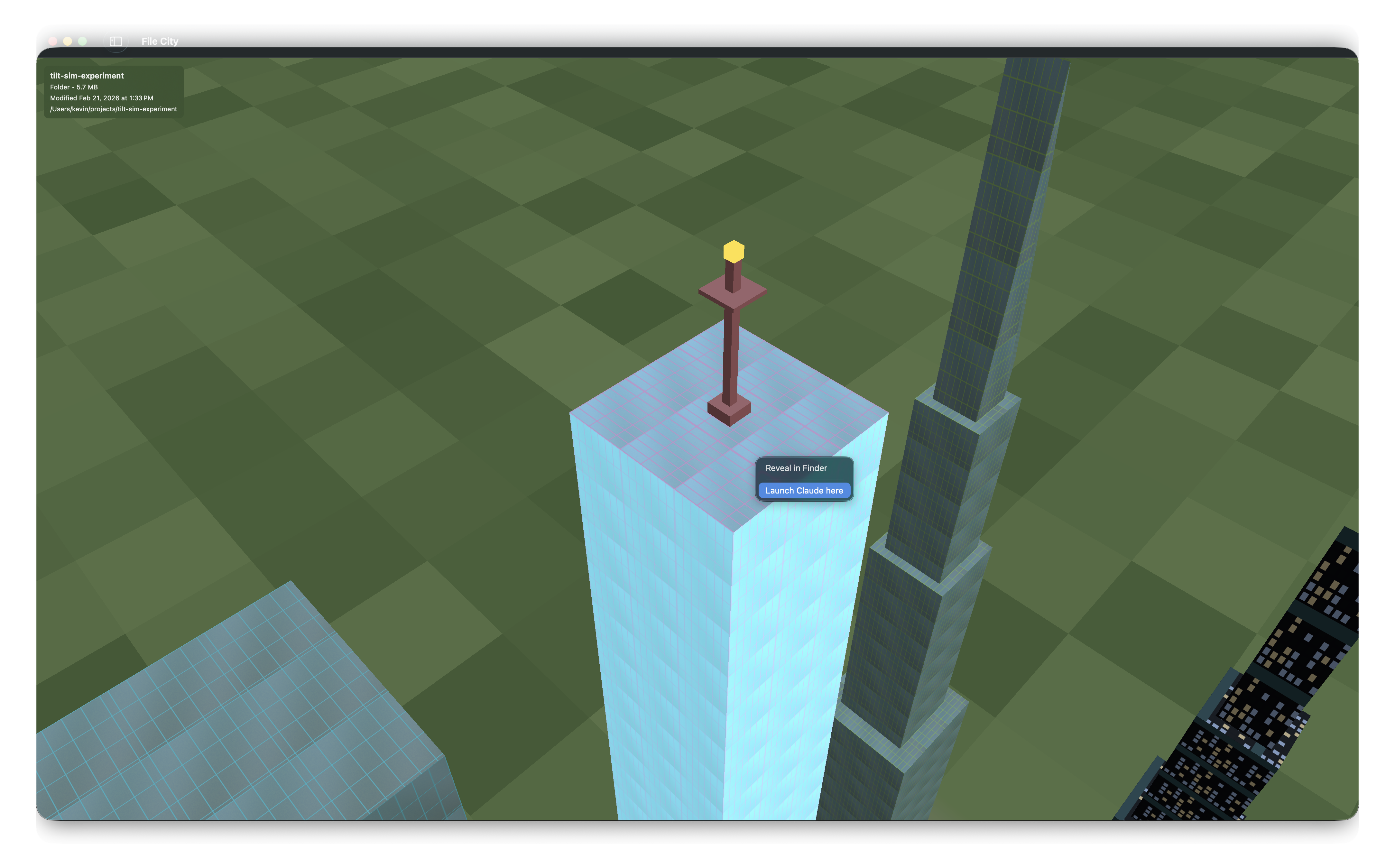
Every building that represents a git repository gets a light beacon on top. Green means the repo is clean. Orange blinking means there are uncommitted changes. Hover over the beacon and it shows the git status: the branch name, and if the repo is dirty, a list of what changed and needs to be committed. Right-click any building and you get a context menu: Reveal in Finder, or Launch Claude here, which opens a Claude Code session in that directory.
What Was Hard, What Was Easy
The source is on GitHub and you can look through the git history yourself. The whole thing was built across six late-night sessions in January 2026. 210 commits, almost all of them between 10pm and 3am. Some features fell into place immediately. Others made me want to close the laptop.
The stuff that just worked: roads and cars, one commit. Planes, one commit. The explosion when you click a plane? Two commits, three minutes apart, because the particle system could reuse the gravity code I already had. First-person controls worked on the first try. The Tesla Model 3 with its animated wheels and glass canopy, one commit. Construction workers, one commit. Satellites with solar panels and elliptical orbits, one commit. When things are purely visual and the feedback loop is instant, you change a number, you see the result, it moves fast.
Hit testing was the thing that would not stay solved. Buildings come in seven-plus shapes, and every time I added a new feature, the raycasting broke again. Beacons on top of pyramids introduced priority conflicts. First-person mode needed center-screen raycasting. Satellites needed hit testing at orbital altitude. I touched that system in fourteen separate commits across the project. It kept coming back like a recurring dream.
The plane banners were the worst. All I wanted was text trailing behind a plane that you could read from both sides. Twelve commits in 42 minutes. The problem was that flipping UV coordinates for the back face also scrambled the word order across the banner segments, and every fix for one side broke the other. When it finally worked, I committed it with the message “FINALLY flags look good.”
The flight physics had a bug that only showed up during barrel rolls. The Metal vertex shader and the CPU physics code were applying rotations in a different order, so the wings would visually detach from the fuselage mid-maneuver. At small angles everything looked fine. You only noticed it when you were upside down, which made it miserable to track down.
File activity monitoring failed twice before I got it working. Watching file reads and writes at the system level on macOS requires a privileged helper daemon, which is 694 lines of SMJobBless boilerplate for what is, conceptually, a file watcher.
The pattern, if it is useful to anyone building something like this: the rendering is the easy part. You change something, you see it, you iterate. The hard part is anything where two coordinate systems have to agree, CPU and GPU, screen space and world space, UV space and text layout. That is where the late nights come from.
What Happened
I built File City over the course of a few weeks and got it to a state where most of these features work. Then I moved on to other things. There are rough edges, but the core experience is there. You can open a directory, see it as a city, walk through it, fly over it, board a plane and do barrel rolls, watch helicopters deliver packages when Claude Code writes a file.
I am putting the source code on GitHub so it does not just sit on my machine. If the idea of piloting a biplane over your node_modules folder sounds appealing to you, the code is there. Fair warning: it is a portfolio project, not a product. But it is one of the more fun things I have built.
I have a problem where I start ambitious projects, get them to the point where they basically work, and then move on to the next thing. File City is one of those projects. But it is also one of the coolest things I have built, so I want to talk about it before it sits in my repositories collecting dust forever.
File City is a native macOS app, written in Swift and Metal, that turns any directory on your computer into a 3D city. Every folder becomes a building. Every file becomes a smaller structure. The whole thing renders in real time on the GPU, and you can walk through it, fly over it, and watch your AI coding agents interact with it.

## The City
When you open a directory, File City scans it recursively and maps the contents onto a grid. Folders become buildings, sized proportionally to how much stuff is inside them. A folder with gigabytes of data becomes a skyscraper with multiple tiers stacked on top of each other, each tier narrower than the one below it, crowned with a decorative shape like a pyramid or a spire. A tiny config file becomes a short block on the street.
The buildings are not random. Each one gets its shape, material, and texture deterministically from its file path, so the same project always looks the same. Swift source files have a distinct look. Images, videos, databases, archives all get their own visual identity. You start to recognize the shape of your codebase after a while.
Between the buildings there are roads, and on those roads there are Tesla Model 3s driving around. They have animated wheels, glass canopies, headlights, taillights, the whole thing. They serve no functional purpose. They just make the city feel alive.

## Walking the Streets
The default view is isometric, looking down at the city from a 45-degree angle. You can zoom, pan, scroll. But the more interesting way to experience it is on foot.
Press F and you drop into first-person mode. WASD to walk, mouse to look around, space to jump. There is collision detection, so you bounce off buildings instead of clipping through them, and you can jump onto rooftops. Double-tap W to sprint. Double-tap space to fly.
The grapple is my favorite part of the movement system. Hold shift while looking at anything and you get pulled toward it at high speed. A building, a car, a plane in the sky. Once you arrive you latch on. If the thing is moving, you ride it. It feels like being Spider-Man. I kept grappling onto the planes to get an aerial view of the city, and at some point I thought: why not just let me fly the plane?

## Flying
So I did. Multiple planes fly above the city on autopilot, each trailing a banner that displays the name of the current directory. They look like little biplanes doing laps over the skyline. You can interact with them in a few ways: hover your cursor over one to speed it up, click one to blow it up (it explodes into 25 physics-simulated debris particles and respawns), or grapple onto one and board it.
When you board a plane, you enter a flight mode with real physics. Thrust, lift, drag, gravity, banking turns. The plane responds to pitch and roll inputs, and the flight model is detailed enough that you can pull off aerobatics. Double-tap W for an outside loop. Double-tap A or D for a barrel roll.

It is the most overengineered feature in the app and the one I had the most fun building.
## The Real Purpose
All of that is fun, but it is not why I built the thing. Around November 2025, AI coding agents crossed a threshold where they could genuinely collaborate on complex projects. I wrote about this in [The Software Printing Press Moment](/the-software-printing-press-moment.md). I wanted to test what these models could do in a 3D domain, which is a harder problem than most coding tasks because you are fighting coordinate systems, GPU shaders, real-time rendering, and physics all at once. But I did not want to build a throwaway demo. I wanted something with actual affordances, something where the 3D representation earned its existence. I used Gemini to help design some of the visual aspects, and Claude Code for most of the systems programming.
The concept I landed on was a file system visualizer for AI agent activity. When you have multiple Claude Code sessions running on the same codebase, it is hard to keep track of what each one is touching. Terminal output scrolls by. File changes pile up. You lose the big picture.
File City was supposed to be the big picture. Each running Claude Code session appears as a satellite orbiting above the city. The satellites have solar panels, antenna dishes, and a status beacon that pulses differently depending on what the session is doing: dim orange when launching, bright blue when idle, fast-pulsing cyan when actively generating. You can grapple onto satellites and ride them around their elliptical orbits, which is fun but not the point.

The point is what happens when those sessions touch files.
## Watching Agents Work
File City monitors file system activity in real time. It filters for AI tools specifically, Claude Code, Codex, Gemini, Cursor, and triggers different animations depending on whether a file is being read or written.
When an agent reads a file, a beam of cyan light shoots up from the corresponding building, 800 units tall, glowing for about two seconds. It looks like the building is being scanned, which is basically what is happening.
When an agent writes a file, a helicopter flies in from offscreen, hovers above the target building, and drops a package. The package falls with physics-based gravity, lands on the rooftop, and explodes in a burst of particles. Then a construction worker pops out of the wreckage, slides down the face of the building, and starts walking around on the surface. Up to 100 workers can be active at once, so a busy coding session leaves little figures all over the city.

The buildings themselves glow during activity, orange for writes and blue for reads, and an info panel shows which process is touching which file. The idea was to sit back, watch the city, and know at a glance which parts of your codebase are being actively worked on by which agent.
## Git
When you load a git directory, a slider appears at the bottom that lets you scrub through the project's commit history, up to 200 commits deep. Drag it left to go back in time, right to come forward. At each position, the city rebuilds itself to reflect the state of the repository at that commit. Buildings appear as new files are added. They grow taller as folders accumulate content. Some shrink or vanish entirely when code gets deleted or refactored away.

You can watch your project grow from its first commit to the present, or rewind to see what it looked like six months ago. You can see the moment a project went from a handful of files to a real codebase. You can spot the commit where someone dumped a giant vendor directory and the skyline jumped. It turns something abstract, a list of commit hashes and diffs, into something spatial.
Every building that represents a git repository gets a light beacon on top. Green means the repo is clean. Orange blinking means there are uncommitted changes. Hover over the beacon and it shows the git status: the branch name, and if the repo is dirty, a list of what changed and needs to be committed. Right-click any building and you get a context menu: Reveal in Finder, or Launch Claude here, which opens a Claude Code session in that directory.

## What Was Hard, What Was Easy
The [source is on GitHub](https://github.com/NSEvent/file-city) and you can look through the git history yourself. The whole thing was built across six late-night sessions in January 2026. 210 commits, almost all of them between 10pm and 3am. Some features fell into place immediately. Others made me want to close the laptop.
The stuff that just worked: roads and cars, one commit. Planes, one commit. The explosion when you click a plane? Two commits, three minutes apart, because the particle system could reuse the gravity code I already had. First-person controls worked on the first try. The Tesla Model 3 with its animated wheels and glass canopy, one commit. Construction workers, one commit. Satellites with solar panels and elliptical orbits, one commit. When things are purely visual and the feedback loop is instant, you change a number, you see the result, it moves fast.
Hit testing was the thing that would not stay solved. Buildings come in seven-plus shapes, and every time I added a new feature, the raycasting broke again. Beacons on top of pyramids introduced priority conflicts. First-person mode needed center-screen raycasting. Satellites needed hit testing at orbital altitude. I touched that system in fourteen separate commits across the project. It kept coming back like a recurring dream.
The plane banners were the worst. All I wanted was text trailing behind a plane that you could read from both sides. Twelve commits in 42 minutes. The problem was that flipping UV coordinates for the back face also scrambled the word order across the banner segments, and every fix for one side broke the other. When it finally worked, I committed it with the message "FINALLY flags look good."
The flight physics had a bug that only showed up during barrel rolls. The Metal vertex shader and the CPU physics code were applying rotations in a different order, so the wings would visually detach from the fuselage mid-maneuver. At small angles everything looked fine. You only noticed it when you were upside down, which made it miserable to track down.
File activity monitoring failed twice before I got it working. Watching file reads and writes at the system level on macOS requires a privileged helper daemon, which is 694 lines of SMJobBless boilerplate for what is, conceptually, a file watcher.
The pattern, if it is useful to anyone building something like this: the rendering is the easy part. You change something, you see it, you iterate. The hard part is anything where two coordinate systems have to agree, CPU and GPU, screen space and world space, UV space and text layout. That is where the late nights come from.
## What Happened
I built File City over the course of a few weeks and got it to a state where most of these features work. Then I moved on to other things. There are rough edges, but the core experience is there. You can open a directory, see it as a city, walk through it, fly over it, board a plane and do barrel rolls, watch helicopters deliver packages when Claude Code writes a file.
I am putting the [source code on GitHub](https://github.com/NSEvent/file-city) so it does not just sit on my machine. If the idea of piloting a biplane over your node_modules folder sounds appealing to you, the code is there. Fair warning: it is a portfolio project, not a product. But it is one of the more fun things I have built.
