🏮 The Chord Your Keyboard Can't Play
TL;DR: Your keyboard can’t actually report every combination of keys you press. It’s wired as a grid, not as individual switches, and certain three-key combinations make a fourth key electrically ambiguous—so the keyboard silently drops it. I found this out because a piano app I built kept “losing” one note out of a four-note chord, and I spent a while hunting a bug that wasn’t in my software. It was in the hardware. It’s called ghosting, and once you see it you can’t unsee it.
One night last month I built Fortepiano, a little Mac app that turns your keyboard into a piano—home row is the white keys, the row above is the black keys, the same layout GarageBand uses for Musical Typing. It’s a few megabytes, it opens instantly, and for about an hour I was very pleased with myself.
Then I played a chord: A, S, Y, and H held together—C, D, G♯, A in piano terms. Three notes sounded. The fourth just… didn’t exist. Press all four, get three. Every time.
My first instinct was that I’d written a bug, and honestly the evidence supported it—I had shipped an actual crash in the octave-shift keys about twenty minutes earlier. So I went looking through my event handling, my note tracking, my polyphony logic. Nothing. Then I did the test that should have come first: I opened TextEdit and held down the same four keys. Three letters appeared.
The fourth keypress never reached macOS at all. No app in the world can handle an event that was never delivered. My piano wasn’t broken—my keyboard was. Or rather, it was working exactly as designed, and the design is the interesting part.
Your keyboard is a grid, not a hundred buttons
I had always assumed—without ever once thinking about it—that each key on a keyboard is its own switch with its own wire. It isn’t. A hundred-ish keys with dedicated wiring would need a hundred-ish traces back to the controller chip, so instead the keys are wired into a matrix: rows and columns, like streets and avenues[1]. Pressing a key connects one row to one column. The controller strobes each column in turn, reads which rows light up, and works out which intersections are closed. Dozens of wires instead of a hundred-plus. Cheap, compact, and it’s been the standard way to build keyboards for decades.
The catch shows up when you hold several keys at once. Close three switches that form an L-shape in the matrix—same row here, same column there—and current finds a path through your three pressed keys that makes a fourth intersection look closed too. The corner of the rectangle. A key you never touched, electrically indistinguishable from a key you did.
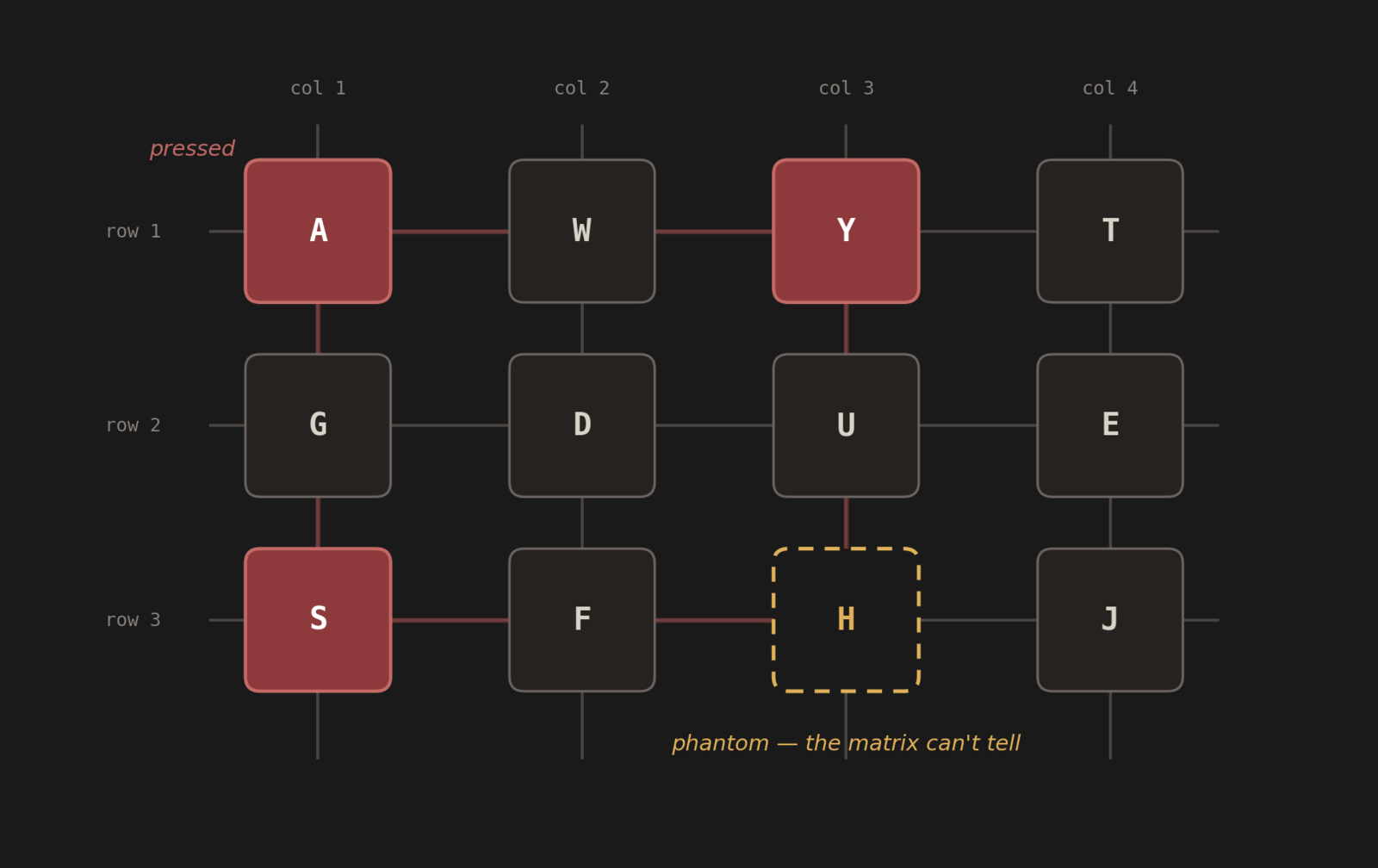
Three real presses, one phantom. The matrix genuinely cannot tell whether H is down. (Key positions illustrative—Apple doesn’t publish its matrix layout.)
That phantom keypress is the original meaning of “ghosting.” And a keyboard that typed letters you didn’t press would be unusable—imagine what that does to a password field—so manufacturers picked the lesser evil: when the controller sees a combination that could produce a ghost, it refuses to register the key that would create the ambiguity[2]. The technical term is blocking, or jamming. From the outside it feels like the keyboard is ignoring you. It’s actually declining to guess.
That’s what happened to my chord. A, S, Y, and H apparently land on the corners of a rectangle in the MacBook’s matrix. Three of them close, and the keyboard decides the fourth is un-knowable and throws it away.
Why you’ve never noticed
Here’s the part I find genuinely elegant: matrix layouts aren’t random. Designers arrange the wiring so that the combinations people actually type—common digraphs, shift-and-a-letter, ctrl-alt-whatever—never form those ambiguous rectangles[2]. Ordinary prose almost never has you holding four letter keys simultaneously. You could type at this keyboard for ten years and never find a seam.
The people who do find the seams are the ones using a typing instrument for something it wasn’t designed for. Gamers found them first—WASD plus jump plus crouch is exactly the kind of cluster that ghosts, which is why “anti-ghosting” became a gaming-keyboard marketing term. And now, apparently, keyboard pianists. A four-note chord voicing is precisely the adversarial input a matrix designer never optimized for: four fingers, one moment, keys scattered across the board in a pattern chosen by music theory instead of English.
The fix has existed all along, and it’s one diode per switch. A diode makes current flow one way, which kills the sneak path through the rectangle, which makes every key independently readable—that’s what N-key rollover (NKRO) means on a mechanical keyboard’s spec sheet. And I love this detail: actual music keyboards, the ones with piano keys, have used a diode per key basically forever, because chords are their entire job[2]. The problem I rediscovered at midnight was solved in the instrument aisle decades ago.
(There’s a second, unrelated ceiling stacked on top: the old USB “boot protocol” report format only has room for six keys plus modifiers, which is where the “6-key rollover” number comes from. That one’s a protocol limit, not a wiring limit, and modern NKRO boards sidestep it with a bitmap report once the OS is up[3]. Two completely different bottlenecks, one lump of user frustration.)
The part that got me
The reason this took me so long to diagnose is a little embarrassing for someone who automates everything: my test harness couldn’t see it. I test the app by posting synthetic keyboard events, and synthetic events are injected downstream of the physical keyboard—they never touch the matrix. Every automated test passed, because in software the chord is perfectly playable. The bug only exists in the meat-and-plastic layer, and the only instrument that can detect it is a human hand. I keep relearning this lesson in different costumes: the simulated keyboard is not the keyboard.
The app-level workaround, by the way, was sitting in the piano the whole time. Pianists play five-note chords through a three-key-rollover bottleneck constantly—it’s called the sustain pedal. Hold the pedal, roll the chord, let the notes stack. I mapped sustain to the spacebar. The 1770s interface fixed the 1960s wiring problem[4].
Citations
[1] Keyboard Ghosting and the SideWinder X4 — Microsoft Applied Sciences ↩
[2] Key rollover — Wikipedia ↩
[3] Myths about USB NKRO and how USB HID works — devever.net ↩
[4] Piano pedals — Wikipedia (foot-operated damper pedals appear on Americus Backers' 1772 grand) ↩
> **TL;DR:** Your keyboard can't actually report every combination of keys you press. It's wired as a grid, not as individual switches, and certain three-key combinations make a fourth key electrically ambiguous—so the keyboard silently drops it. I found this out because a piano app I built kept "losing" one note out of a four-note chord, and I spent a while hunting a bug that wasn't in my software. It was in the hardware. It's called ghosting, and once you see it you can't unsee it.
One night last month I built [Fortepiano](https://kevintang.xyz/fortepiano?utm_source=kevin-md&utm_medium=post&utm_campaign=fortepiano-202608), a little Mac app that turns your keyboard into a piano—home row is the white keys, the row above is the black keys, the same layout GarageBand uses for Musical Typing. It's a few megabytes, it opens instantly, and for about an hour I was very pleased with myself.
Then I played a chord: A, S, Y, and H held together—C, D, G♯, A in piano terms. Three notes sounded. The fourth just... didn't exist. Press all four, get three. Every time.
My first instinct was that I'd written a bug, and honestly the evidence supported it—I had shipped an actual crash in the octave-shift keys about twenty minutes earlier. So I went looking through my event handling, my note tracking, my polyphony logic. Nothing. Then I did the test that should have come first: I opened TextEdit and held down the same four keys. Three letters appeared.
The fourth keypress never reached macOS at all. No app in the world can handle an event that was never delivered. My piano wasn't broken—my *keyboard* was. Or rather, it was working exactly as designed, and the design is the interesting part.
## Your keyboard is a grid, not a hundred buttons
I had always assumed—without ever once thinking about it—that each key on a keyboard is its own switch with its own wire. It isn't. A hundred-ish keys with dedicated wiring would need a hundred-ish traces back to the controller chip, so instead the keys are wired into a matrix: rows and columns, like streets and avenues<sup><a href="#cite-1" id="ref-1">[1]</a></sup>. Pressing a key connects one row to one column. The controller strobes each column in turn, reads which rows light up, and works out which intersections are closed. Dozens of wires instead of a hundred-plus. Cheap, compact, and it's been the standard way to build keyboards for decades.
The catch shows up when you hold several keys at once. Close three switches that form an L-shape in the matrix—same row here, same column there—and current finds a path through your three pressed keys that makes a *fourth* intersection look closed too. The corner of the rectangle. A key you never touched, electrically indistinguishable from a key you did.

*Three real presses, one phantom. The matrix genuinely cannot tell whether H is down. (Key positions illustrative—Apple doesn't publish its matrix layout.)*
That phantom keypress is the original meaning of "ghosting." And a keyboard that typed letters you didn't press would be unusable—imagine what that does to a password field—so manufacturers picked the lesser evil: when the controller sees a combination that *could* produce a ghost, it refuses to register the key that would create the ambiguity<sup><a href="#cite-2" id="ref-2">[2]</a></sup>. The technical term is blocking, or jamming. From the outside it feels like the keyboard is ignoring you. It's actually declining to guess.
That's what happened to my chord. A, S, Y, and H apparently land on the corners of a rectangle in the MacBook's matrix. Three of them close, and the keyboard decides the fourth is un-knowable and throws it away.
## Why you've never noticed
Here's the part I find genuinely elegant: matrix layouts aren't random. Designers arrange the wiring so that the combinations people actually type—common digraphs, shift-and-a-letter, ctrl-alt-whatever—never form those ambiguous rectangles<sup><a href="#cite-2" id="ref-2b">[2]</a></sup>. Ordinary prose almost never has you holding four letter keys simultaneously. You could type at this keyboard for ten years and never find a seam.
The people who *do* find the seams are the ones using a typing instrument for something it wasn't designed for. Gamers found them first—WASD plus jump plus crouch is exactly the kind of cluster that ghosts, which is why "anti-ghosting" became a gaming-keyboard marketing term. And now, apparently, keyboard pianists. A four-note chord voicing is precisely the adversarial input a matrix designer never optimized for: four fingers, one moment, keys scattered across the board in a pattern chosen by music theory instead of English.
The fix has existed all along, and it's one diode per switch. A diode makes current flow one way, which kills the sneak path through the rectangle, which makes every key independently readable—that's what N-key rollover (NKRO) means on a mechanical keyboard's spec sheet. And I love this detail: actual music keyboards, the ones with piano keys, have used a diode per key basically forever, because chords are their entire job<sup><a href="#cite-2" id="ref-2c">[2]</a></sup>. The problem I rediscovered at midnight was solved in the instrument aisle decades ago.
(There's a second, unrelated ceiling stacked on top: the old USB "boot protocol" report format only has room for six keys plus modifiers, which is where the "6-key rollover" number comes from. That one's a protocol limit, not a wiring limit, and modern NKRO boards sidestep it with a bitmap report once the OS is up<sup><a href="#cite-3" id="ref-3">[3]</a></sup>. Two completely different bottlenecks, one lump of user frustration.)
## The part that got me
The reason this took me so long to diagnose is a little embarrassing for someone who automates everything: my test harness couldn't see it. I test the app by posting synthetic keyboard events, and synthetic events are injected downstream of the physical keyboard—they never touch the matrix. Every automated test passed, because in software the chord is perfectly playable. The bug only exists in the meat-and-plastic layer, and the only instrument that can detect it is a human hand. I keep relearning this lesson in different costumes: the simulated keyboard is not the keyboard.
The app-level workaround, by the way, was sitting in the piano the whole time. Pianists play five-note chords through a three-key-rollover bottleneck constantly—it's called the sustain pedal. Hold the pedal, roll the chord, let the notes stack. I mapped sustain to the spacebar. The 1770s interface fixed the 1960s wiring problem<sup><a href="#cite-4" id="ref-4">[4]</a></sup>.
## Citations
<p id="cite-1">[1] <a href="https://www.microsoft.com/applied-sciences/projects/anti-ghosting" target="_blank" rel="noopener noreferrer">Keyboard Ghosting and the SideWinder X4</a> — Microsoft Applied Sciences <a href="#ref-1">↩</a></p>
<p id="cite-2">[2] <a href="https://en.wikipedia.org/wiki/Key_rollover" target="_blank" rel="noopener noreferrer">Key rollover</a> — Wikipedia <a href="#ref-2">↩</a></p>
<p id="cite-3">[3] <a href="https://www.devever.net/~hl/usbnkro" target="_blank" rel="noopener noreferrer">Myths about USB NKRO and how USB HID works</a> — devever.net <a href="#ref-3">↩</a></p>
<p id="cite-4">[4] <a href="https://en.wikipedia.org/wiki/Piano_pedals" target="_blank" rel="noopener noreferrer">Piano pedals</a> — Wikipedia (foot-operated damper pedals appear on Americus Backers' 1772 grand) <a href="#ref-4">↩</a></p>