👻 The Business Card That Lights Up When You Tap It
TL;DR: I made a circuit-board business card with an NFC chip and a batteryless LED powered by the phone tapping it. The hardware worked, but ordinary iPhone NFC apps couldn’t format the blank NTAG I²C Plus chip. I wrote a tiny Core NFC app that sends the chip’s native commands directly, and now each tap opens my site and lights Charizard’s tail.
I wanted a business card that wasn’t a piece of paper. Not out of some deep philosophy—I just thought it would be fun to hand someone a circuit board. So I designed one: credit-card sized, glossy black, with gold artwork and my name on it. Standard so far. The two things that make it not-just-a-card are both invisible until you bring a phone near it.
The first is an NFC chip. Tap the card to a phone and it opens kevintang.xyz—the same technology as a tap-to-pay card or a transit pass, running at 13.56 MHz[1]. There’s a spiral of copper wound seven times around the edge of the board; that’s the antenna, and getting it to resonate at the right frequency is most of the work. That part I expected.
The second thing is the part I can’t stop thinking about. There’s a little Charizard printed on the card, and a red LED sits right at the tip of its tail—so tap the card to a phone and its tail catches fire. There’s no battery on the card. There’s no coin cell, no wire, nothing to charge. The LED is running entirely on energy the phone is throwing off.
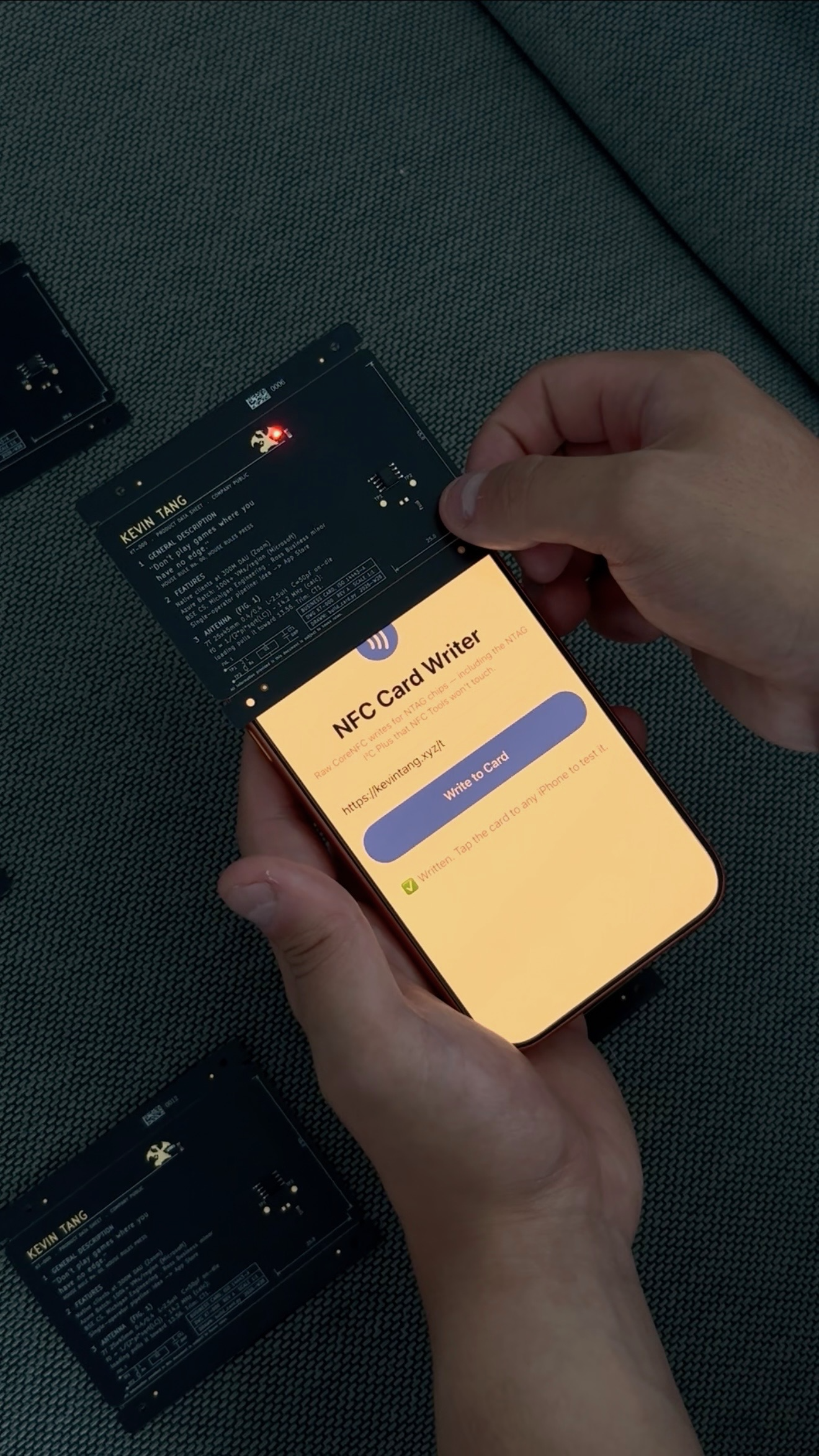
The card mid-write—my own little app pushing the URL onto the chip—with the harvest LED lit from nothing but the phone’s field. Several more waiting their turn.
An object that borrows power
Here’s what’s actually happening, and it took me a while to stop finding it magical (I haven’t, really). An NFC phone doesn’t just listen for a tag—it broadcasts a strong radio field to power the tag, because the tag has no battery either. The chip in a normal NFC sticker wakes up on that borrowed energy just long enough to answer, then goes dark the moment the phone leaves. What I didn’t appreciate until I built one is that some chips will hand you the leftover power on a pin, to do whatever you want with. NXP’s datasheet lists a typical harvested output of about 5 milliamps at 2 volts under one test setup[2]—not much, but plenty to light an LED, or blink a low-power sensor, or wake a tiny microcontroller for a fraction of a second.
And the way it answers is stranger than it sounds: the tag never transmits a signal of its own. It replies by changing how much of the phone’s field it absorbs, instant to instant, and the phone feels those little tugs on its own signal and reads them as ones and zeros. The analogy I keep coming back to is a mirror. A mirror makes no light—it only reflects a source. A passive NFC tag makes no radio of its own—it reflects the phone’s, flickering it into a message. The phone brings all the energy; the card just decides what to bounce back.
(This, incidentally, is the NFC-versus-RFID distinction I used to fumble: NFC isn’t a rival to RFID, it’s the short-range, 13.56 MHz corner of it—close range on purpose, so the card talks only to the thing you deliberately touch it to.)
I’d always thought of NFC as a way to make the phone do something: open a link, pay for coffee, check in. But this flips it. The tap makes the card do something. For the half-second your phone is near it, the card is a live device—an inert rectangle of fiberglass that comes alive in your hand because you brought a battery near it. Once you’ve felt that, you start seeing NFC taps differently. You’re not reading the tag. You’re powering it.
It’s not a brand-new idea—U.S. Bank shipped a credit card a few years ago whose logo glows during a contactless payment, and it was popular enough that they ran short of them[3]—but it’s rare, and it feels like a small miracle every time. And it points at a whole category of objects: things that don’t need a battery because they only need to be alive for the instant you’re touching them with a phone you were already holding.
The card is a program
I designed the whole board as code, which I’d recommend to anyone who, like me, finds dragging traces around with a mouse maddening. KiCad—the free PCB tool—has a Python API, so the entire card is generated by a script. Every trace, the antenna coil, the position of each letter: it’s all computed. Want the coil to have one more turn? Change a number, re-run, done. The board is reproducible the way a program is reproducible, which for a hardware novice is enormously reassuring—there’s no precious hand-drawn artifact I’m afraid to touch.
I couldn’t resist a couple of jokes for anyone who’d flip the card over. The back is laid out like a component datasheet—the dense reference document every hardware part ships with—complete with the actual resonance math for the antenna printed right there in the silkscreen, and two real exposed test points a curious engineer could probe with a meter to check my numbers. And on the front, where a chip card has its little gold square of contacts, mine has only a drawing of one—that same eight-pad footprint printed into the board with nothing underneath it. The real NFC chip is hidden on the back; the thing that looks like the chip is a decoy. Anyone who’s laid out a circuit board clocks it instantly—everyone else just sees a chip card. It’s there for whoever looks closely.
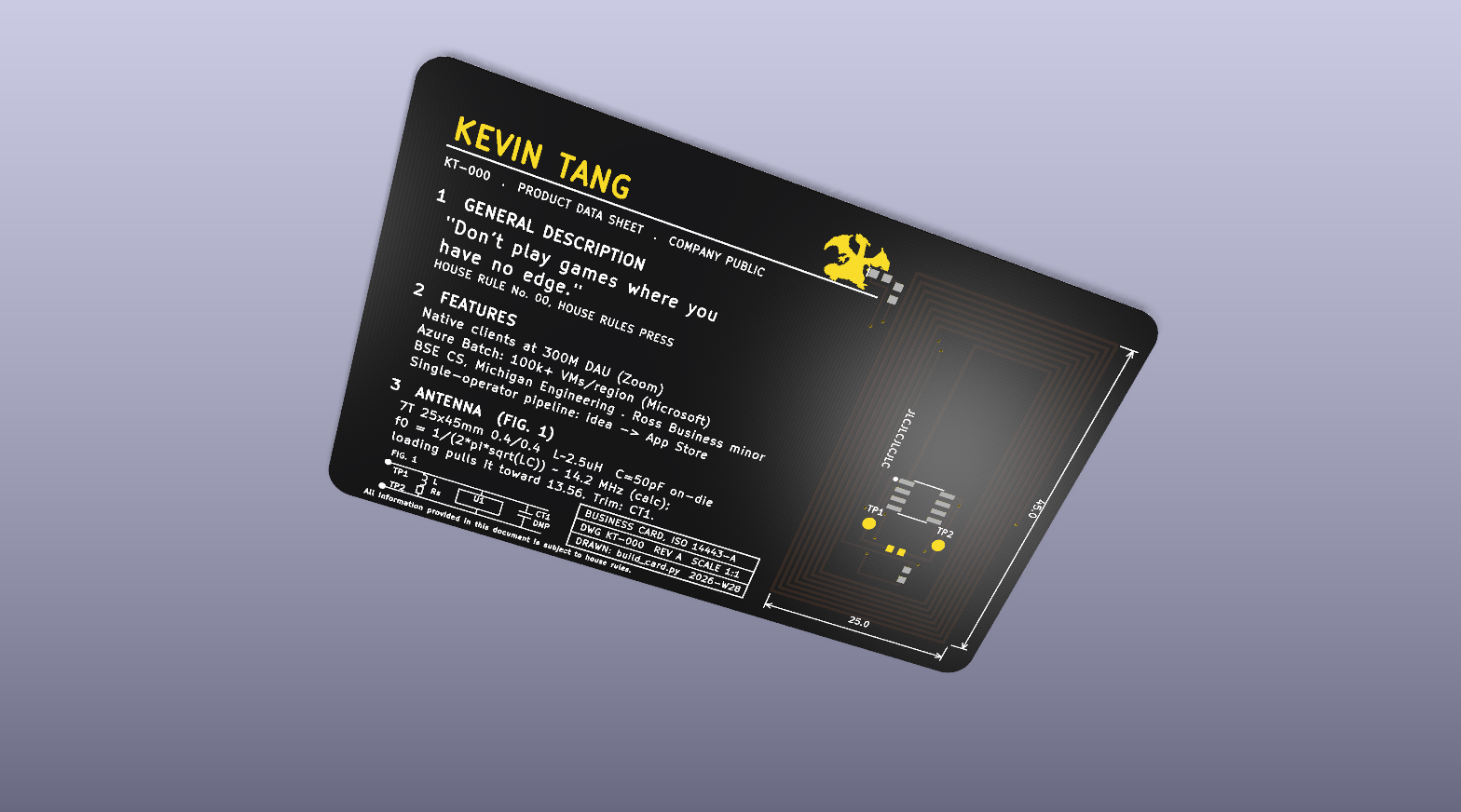
The back, straight from the design files—laid out like a real datasheet, resonance math and all, with TP1/TP2 you can actually probe. The Charizard’s tail is where the LED lives.
Then I sent it to a factory. This is the genuinely wild part of modern hardware: I uploaded my files to JLCPCB, and for about seventy-five dollars they manufactured ten copies and soldered the chip and the LED onto each one[4]. Ten assembled circuit boards, in the mail, for the price of a nice dinner. A few days later, this little blue box showed up:
Inside were ten beautiful cards, and I was very pleased with myself. For about a day.
Then I couldn’t write to it
I tapped the first card to my phone. The LED flickered—so it was getting power, the antenna worked, the hard electrical part was fine—but nothing happened. No link. The card had power but no message.
That’s expected: a blank chip needs you to write the URL onto it. So I opened NFC Tools, the standard app everyone uses for this, held the card to my iPhone, and got: “NFC tag not supported.”
I had made a rookie mistake in chip selection. The chip I’d picked, the NTAG I²C Plus[2], is not really a plain sticker tag. It’s a bridge chip—designed to sit inside a gadget and talk to a microcontroller over a wire, with the NFC part as a bonus. It’s the same chip that gives me the energy-harvesting pin I wanted for the LED, which is exactly why I chose it. But it ships blank, without the NDEF formatting that tells a consumer app where a URL record belongs. NFC Tools uses iOS’s high-level NDEF path, which treated my blank chip as unsupported instead of formatting it.
Fine, I thought. I’ll try an Android instead—its NFC stack is far more permissive about this kind of thing. I dug out my backup phone, went to install the app, and discovered that my cheap prepaid Android doesn’t have an NFC radio at all. The model officially supports NFC; my particular carrier’s version of it had the chip left out to save a dollar. The phone literally cannot do NFC. There is no app for missing hardware.
The ordinary iPhone app wouldn’t; my Android couldn’t. Ten gorgeous cards, and no way to put a single word on any of them.
Writing my own key
The thing that got me unstuck was realizing the consumer apps weren’t failing because the chip couldn’t be written—they were stopping at the high-level NDEF check. Underneath, this chip answers the same basic memory commands as common NFC tags. It’s command-compatible where it counts. The apps were bouncers checking IDs at the door; the chip inside would happily take my order.
And iOS, it turns out, will let you send a tag raw commands—if you’re willing to write the app yourself. Apple’s Core NFC framework has a low-level mode where you talk to the tag directly instead of asking iOS to interpret it for you[5]. So I wrote a very small iPhone app—about sixty lines that matter—that does exactly one thing: open an NFC session and send the write commands by hand. First the little header that declares “I’m a URL tag,” then my web address, spelled out four bytes at a time across the chip’s memory, each command acknowledged before the next.
I built it onto my phone, opened it, tapped a card, and watched it count up the pages: writing, writing, done. Then I locked the phone, tapped the card again like a stranger would, and a banner popped up offering to open my site. It worked. It has worked on every card since.
One quirk: I have to hold the card right against the top edge of the phone or the write fails. The coupling is tight, and I’m fairly sure the reason is that glowing LED—it’s drinking some of the same power the chip needs to do its job, so there’s less margin than a plain tag would have. A fun problem to have. It’s on the list for the next revision: a little less glow, a little more range, and decide how I feel about that trade.
The part I keep thinking about
What this drove home—again—is that the hard part of a hardware project is often the software at the very end: the last inch between “the object physically exists” and “the object does the thing.” The electronics were textbook. The antenna math worked on the first try. What nearly beat me was a compatibility checkbox in an app that had never heard of my chip.
But that’s not what I think about when I hold the card. What I think about is the glow. It’s a flat piece of fiberglass with no power source, and it comes alive because you waved a phone at it. I set out to make a business card that opens a website, which is a mildly clever party trick. I ended up more interested in the few milliwatts of borrowed light—because that same trick, the object waking up on power it doesn’t own, is the seed of a hundred other things I now want to build.
Anyway. If we meet and I hand you a black card, tap it. And watch the tail.
Citations
[1] Near-field communication — Wikipedia (NFC operates at 13.56 MHz) ↩
[2] NT3H2111/NT3H2211 NTAG I²C plus datasheet — NXP Semiconductors (energy harvesting output, ~5 mA typical) ↩
[3] U.S. Bank Shopper Cash Rewards Visa launch — Business Wire (LED card that illuminates during contactless payment) ↩
[4] JLCPCB — PCB fabrication and assembly service ↩
[5] sendMiFareCommand — Apple Developer documentation (sending native commands to an NFC tag) ↩
> TL;DR: I made a circuit-board business card with an NFC chip and a batteryless LED powered by the phone tapping it. The hardware worked, but ordinary iPhone NFC apps couldn't format the blank NTAG I²C Plus chip. I wrote a tiny Core NFC app that sends the chip's native commands directly, and now each tap opens my site and lights Charizard's tail.
I wanted a business card that wasn't a piece of paper. Not out of some deep philosophy—I just thought it would be fun to hand someone a circuit board. So I designed one: credit-card sized, glossy black, with gold artwork and my name on it. Standard so far. The two things that make it not-just-a-card are both invisible until you bring a phone near it.
The first is an NFC chip. Tap the card to a phone and it opens [kevintang.xyz](https://kevintang.xyz)—the same technology as a tap-to-pay card or a transit pass, running at 13.56 MHz<sup><a href="#cite-1" id="ref-1">[1]</a></sup>. There's a spiral of copper wound seven times around the edge of the board; that's the antenna, and getting it to resonate at the right frequency is most of the work. That part I expected.
The second thing is the part I can't stop thinking about. There's a little Charizard printed on the card, and a red LED sits right at the tip of its tail—so tap the card to a phone and its tail catches fire. There's no battery on the card. There's no coin cell, no wire, nothing to charge. The LED is running entirely on energy the phone is throwing off.

The card mid-write—my own little app pushing the URL onto the chip—with the harvest LED lit from nothing but the phone's field. Several more waiting their turn.
## An object that borrows power
Here's what's actually happening, and it took me a while to stop finding it magical (I haven't, really). An NFC phone doesn't just listen for a tag—it broadcasts a strong radio field to power the tag, because the tag has no battery either. The chip in a normal NFC sticker wakes up on that borrowed energy just long enough to answer, then goes dark the moment the phone leaves. What I didn't appreciate until I built one is that some chips will hand you the leftover power on a pin, to do whatever you want with. NXP's datasheet lists a typical harvested output of about 5 milliamps at 2 volts under one test setup<sup><a href="#cite-2" id="ref-2">[2]</a></sup>—not much, but plenty to light an LED, or blink a low-power sensor, or wake a tiny microcontroller for a fraction of a second.
And the way it answers is stranger than it sounds: the tag never transmits a signal of its own. It replies by changing how much of the phone's field it absorbs, instant to instant, and the phone feels those little tugs on its own signal and reads them as ones and zeros. The analogy I keep coming back to is a mirror. A mirror makes no light—it only reflects a source. A passive NFC tag makes no radio of its own—it reflects the phone's, flickering it into a message. The phone brings all the energy; the card just decides what to bounce back.
(This, incidentally, is the NFC-versus-RFID distinction I used to fumble: NFC isn't a rival to RFID, it's the short-range, 13.56 MHz corner of it—close range on purpose, so the card talks only to the thing you deliberately touch it to.)
I'd always thought of NFC as a way to make the phone do something: open a link, pay for coffee, check in. But this flips it. The tap makes the card do something. For the half-second your phone is near it, the card is a live device—an inert rectangle of fiberglass that comes alive in your hand because you brought a battery near it. Once you've felt that, you start seeing NFC taps differently. You're not reading the tag. You're powering it.
It's not a brand-new idea—U.S. Bank shipped a credit card a few years ago whose logo glows during a contactless payment, and it was popular enough that they ran short of them<sup><a href="#cite-3" id="ref-3">[3]</a></sup>—but it's rare, and it feels like a small miracle every time. And it points at a whole category of objects: things that don't need a battery because they only need to be alive for the instant you're touching them with a phone you were already holding.
## The card is a program
I designed the whole board as code, which I'd recommend to anyone who, like me, finds dragging traces around with a mouse maddening. KiCad—the free PCB tool—has a Python API, so the entire card is generated by a script. Every trace, the antenna coil, the position of each letter: it's all computed. Want the coil to have one more turn? Change a number, re-run, done. The board is reproducible the way a program is reproducible, which for a hardware novice is enormously reassuring—there's no precious hand-drawn artifact I'm afraid to touch.
I couldn't resist a couple of jokes for anyone who'd flip the card over. The back is laid out like a component datasheet—the dense reference document every hardware part ships with—complete with the actual resonance math for the antenna printed right there in the silkscreen, and two real exposed test points a curious engineer could probe with a meter to check my numbers. And on the front, where a chip card has its little gold square of contacts, mine has only a drawing of one—that same eight-pad footprint printed into the board with nothing underneath it. The real NFC chip is hidden on the back; the thing that looks like the chip is a decoy. Anyone who's laid out a circuit board clocks it instantly—everyone else just sees a chip card. It's there for whoever looks closely.

The back, straight from the design files—laid out like a real datasheet, resonance math and all, with TP1/TP2 you can actually probe. The Charizard's tail is where the LED lives.
Then I sent it to a factory. This is the genuinely wild part of modern hardware: I uploaded my files to JLCPCB, and for about seventy-five dollars they manufactured ten copies and soldered the chip and the LED onto each one<sup><a href="#cite-4" id="ref-4">[4]</a></sup>. Ten assembled circuit boards, in the mail, for the price of a nice dinner. A few days later, this little blue box showed up:

Inside were ten beautiful cards, and I was very pleased with myself. For about a day.
## Then I couldn't write to it
I tapped the first card to my phone. The LED flickered—so it was getting power, the antenna worked, the hard electrical part was fine—but nothing happened. No link. The card had power but no message.
That's expected: a blank chip needs you to write the URL onto it. So I opened NFC Tools, the standard app everyone uses for this, held the card to my iPhone, and got: "NFC tag not supported."
I had made a rookie mistake in chip selection. The chip I'd picked, the NTAG I²C Plus<sup><a href="#cite-2" id="ref-2b">[2]</a></sup>, is not really a plain sticker tag. It's a bridge chip—designed to sit inside a gadget and talk to a microcontroller over a wire, with the NFC part as a bonus. It's the same chip that gives me the energy-harvesting pin I wanted for the LED, which is exactly why I chose it. But it ships blank, without the NDEF formatting that tells a consumer app where a URL record belongs. NFC Tools uses iOS's high-level NDEF path, which treated my blank chip as unsupported instead of formatting it.
Fine, I thought. I'll try an Android instead—its NFC stack is far more permissive about this kind of thing. I dug out my backup phone, went to install the app, and discovered that my cheap prepaid Android doesn't have an NFC radio at all. The model officially supports NFC; my particular carrier's version of it had the chip left out to save a dollar. The phone literally cannot do NFC. There is no app for missing hardware.
The ordinary iPhone app wouldn't; my Android couldn't. Ten gorgeous cards, and no way to put a single word on any of them.
## Writing my own key
The thing that got me unstuck was realizing the consumer apps weren't failing because the chip couldn't be written—they were stopping at the high-level NDEF check. Underneath, this chip answers the same basic memory commands as common NFC tags. It's command-compatible where it counts. The apps were bouncers checking IDs at the door; the chip inside would happily take my order.
And iOS, it turns out, will let you send a tag raw commands—if you're willing to write the app yourself. Apple's Core NFC framework has a low-level mode where you talk to the tag directly instead of asking iOS to interpret it for you<sup><a href="#cite-5" id="ref-5">[5]</a></sup>. So I wrote a very small iPhone app—about sixty lines that matter—that does exactly one thing: open an NFC session and send the write commands by hand. First the little header that declares "I'm a URL tag," then my web address, spelled out four bytes at a time across the chip's memory, each command acknowledged before the next.
I built it onto my phone, opened it, tapped a card, and watched it count up the pages: writing, writing, done. Then I locked the phone, tapped the card again like a stranger would, and a banner popped up offering to open my site. It worked. It has worked on every card since.
One quirk: I have to hold the card right against the top edge of the phone or the write fails. The coupling is tight, and I'm fairly sure the reason is that glowing LED—it's drinking some of the same power the chip needs to do its job, so there's less margin than a plain tag would have. A fun problem to have. It's on the list for the next revision: a little less glow, a little more range, and decide how I feel about that trade.
## The part I keep thinking about
What this drove home—again—is that the hard part of a hardware project is often the software at the very end: the last inch between "the object physically exists" and "the object does the thing." The electronics were textbook. The antenna math worked on the first try. What nearly beat me was a compatibility checkbox in an app that had never heard of my chip.
But that's not what I think about when I hold the card. What I think about is the glow. It's a flat piece of fiberglass with no power source, and it comes alive because you waved a phone at it. I set out to make a business card that opens a website, which is a mildly clever party trick. I ended up more interested in the few milliwatts of borrowed light—because that same trick, the object waking up on power it doesn't own, is the seed of a hundred other things I now want to build.
Anyway. If we meet and I hand you a black card, tap it. And watch the tail.
## Citations
<p id="cite-1">[1] <a href="https://en.wikipedia.org/wiki/Near-field_communication" target="_blank" rel="noopener noreferrer">Near-field communication</a> — Wikipedia (NFC operates at 13.56 MHz) <a href="#ref-1">↩</a></p>
<p id="cite-2">[2] <a href="https://www.nxp.com/docs/en/data-sheet/NT3H2111_2211.pdf" target="_blank" rel="noopener noreferrer">NT3H2111/NT3H2211 NTAG I²C plus datasheet</a> — NXP Semiconductors (energy harvesting output, ~5 mA typical) <a href="#ref-2">↩</a></p>
<p id="cite-3">[3] <a href="https://www.businesswire.com/news/home/20221019006081/en/U.S.-Bank-Shopper-Cash-Rewards%E2%84%A2-Visa-Signature%C2%AE-Card-slims-wallets-expenses" target="_blank" rel="noopener noreferrer">U.S. Bank Shopper Cash Rewards Visa launch</a> — Business Wire (LED card that illuminates during contactless payment) <a href="#ref-3">↩</a></p>
<p id="cite-4">[4] <a href="https://jlcpcb.com/" target="_blank" rel="noopener noreferrer">JLCPCB</a> — PCB fabrication and assembly service <a href="#ref-4">↩</a></p>
<p id="cite-5">[5] <a href="https://developer.apple.com/documentation/corenfc/nfcmifaretag/sendmifarecommand(commandpacket:completionhandler:)" target="_blank" rel="noopener noreferrer">sendMiFareCommand</a> — Apple Developer documentation (sending native commands to an NFC tag) <a href="#ref-5">↩</a></p>